



 Range Rover: Driving position memory
 WARNING
Before activating the seat memory, ensure that the area immediately surrounding the seat is clear of obstructions and that all occupants are clear of moving parts.
Once you have adjusted the power operated driver's seat, steering column (see 25, ADJUSTING THE STEERING WHEEL) and exterior mirrors (see 50, EXTERIOR MIRRORS) for your ideal driving position, the vehicle can memorize these settings for future use.
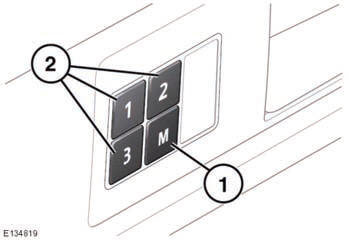
1. Press the memory store (M) button to activate the memory function.
2. Press one of the preset buttons within 5 seconds to memorize the current settings. MEMORY (1, 2 or 3) SETTINGS SAVED will be displayed on the message center, accompanied by an audible chime to confirm the settings have been memorized.
3. To recall a stored position press the relevant preset button. MEMORY (1, 2 OR 3) RECALLED will be displayed in the message center.
A seat position will only be memorized during the 5 second active period.
Any existing settings will be over-written when programing a memory position.
 Folding armrest
The folding armrest may be stowed by moving to the vertical position. Use the
adjuster wheel (arrowed) to set the required height. ...
 Rear seats
...
See also:
DVD Distortion
Video distortion can occur when operating cellular phones, scanners, CB radios,
Global Positioning Systems (GPS)*, two-way radios, mobile fax machines, or walkie
talkies.
It might be necessary to t ...
Safety Belt Reminders
Driver Safety Belt Reminder Light
There is a driver safety belt reminder light on the instrument panel cluster.
When the vehicle is started, this light flashes and a chime may come on to remind
t ...
Headlamp removal
WARNING
Do not attempt to change any bulb with the lighting switch on. If the lighting
has just been switched off, give the bulbs time to cool down. Handling them in a
hot conditio ...


