



 Mercedes-Benz GL-Class: Door control panel
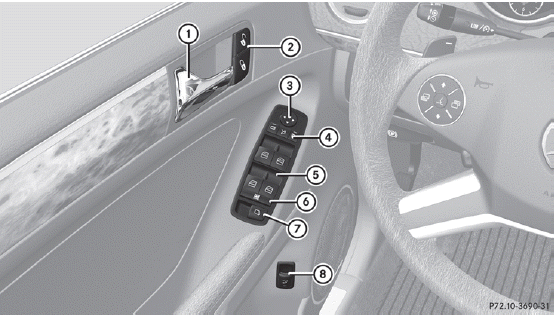
1 Opens the door
2  Unlocks/locks the vehicle
3  Adjusts the exterior mirrors
4  Selects the exterior mirror,
electrically folds the exterior mirrors in/out
Selects the exterior mirror,
electrically folds the exterior mirrors in/out
5  Opens/closes the side windows
6  Activates/deactivates the
override feature for the side windows in the rear compartment
Activates/deactivates the
override feature for the side windows in the rear compartment
7  Opens/closes the hinged power
side windows
Opens/closes the hinged power
side windows
8  Opens/closes the tailgate
 Overhead control panel
1 Switches the lefthand
reading lamp on/off
2 Switches the rear
interior lighting on/off
3 Switches the
automatic interior lighting
control on/off
4 Switches the front
interior lighti ...
 Safety
...
See also:
Remote control
1. Press to undock remote control.
NOTICE
Do not press the touch screen to undock the remote control.
2. Touch screen.
3. Home screen.
4. Video source.
5. Audio source.
6. Right screen s ...
Telephone compatibility
Please refer to the Ownership section of the Land Rover website at www.landrover.com,
for a list of compatible phones.
Note: The Bluetooth® equipped phones listed on landrover.com have been tested ...
Fuel tank capacity
Avoid the risk of running out of fuel and never intentionally drive the vehicle
when the fuel gauge indicates that the tank is empty. When refueling your vehicle
after the fuel gauge reads empty, ...


