



 Cadillac Escalade: Display
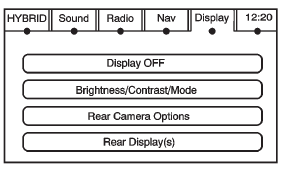
Press CONFIG to enter the configure menu options, then press CONFIG repeatedly until Display is selected or press the Display screen button.
Display OFF
Press this screen button to turn the display off. Press any control button to view the display.
Brightness/Contrast/Mode
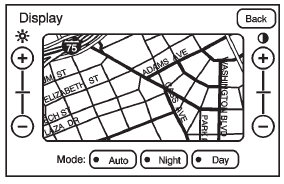
Press this screen button to change the brightness, contrast, and mode of the display.
 (Brightness): Press + or − to increase
or decrease the brightness of the screen.
(Brightness): Press + or − to increase
or decrease the brightness of the screen.
 (Contrast): Press + or − to increase
or decrease the contrast of the screen.
(Contrast): Press + or − to increase
or decrease the contrast of the screen.
Auto (Automatic): Press so the system can automatically adjust the screen background depending on exterior lighting conditions.
Night: Press to make the map background darker.
Day: Press to make the map background brighter.
 XM Weather
Press the Weather screen button to display the Current or Extended Forecast Weather.
The Extended Forecast Weather screen displays five days of the forecasted weather
at the vehicle’s current posi ...
 Rear Vision Camera
Rear Camera Options: Press to display options available.
The available options are:
Video: Press to turn on or off.
Symbols: Press to turn on or off.
Guiding Lines: Press to turn on or off.
For ...
See also:
Screen modes
Touch the screen mode selection button to view a series of icons, each depicting
a different screen mode (as detailed below). Touch the relevant icon to select the
desired screen mode.
...
Engine malfunction (amber)
Illuminates as a bulb check when the ignition is switched on and extinguishes
when the engine is started.
If the lamp flashes or illuminates at any other time, there is a fault with the
engine. ...
Advanced emergency brake assist
NOTICE
The system may not react to slow moving vehicles and will not react to stationary
vehicles or vehicles traveling in the opposite direction.
NOTICE
WARNINGs may not appear if ...


