



 Buick Enclave: Cargo Management System
This vehicle has a cargo management system located in the rear.
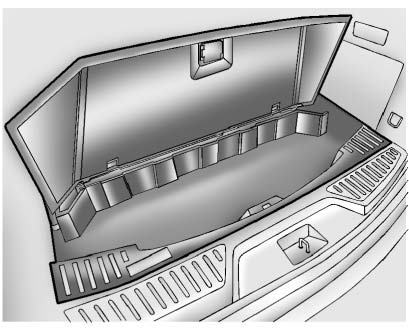
To remove the cargo management cover:
1. Open the cover. It remains open when lifted.
2. Pull the cover up making sure to unhook the hinges at the rear of the cover.
 WARNING
An improperly latched and closed cargo cover, or cargo cover left in the open
position, could be thrown about the vehicle during a crash or sudden maneuver.
Someone could be injured.
Be sure to return the cover to the closed position and latch before driving. If the cover is removed, always store it outside of the vehicle. When it is replaced, always be sure that it is securely reattached.
3. Remove the cover from the vehicle and store outside of the vehicle.
 Cargo Tie-Downs
Four cargo tie-downs are located in the rear compartment of the vehicle.
The tie-downs can be used to secure small loads. ...
 Convenience Net
For vehicles with a convenience net in the rear, use it to store small loads
as far forward as possible.
The net should not be used to store heavy loads. ...
See also:
Exterior and interior lights
: See an INFINITI retailer for replacement.
NOTE: Always check with the Parts Department at an INFINITI retailer for the
latest
information about parts.
Replacement procedures
All other ligh ...
Engine Compartment Overview
6.2L V8 Engine
A. Engine Air Cleaner/Filter .
B. Coolant Surge Tank and Pressure Cap. See Cooling System .
C. Remote Positive (+) Terminal. See Jump Starting .
D. Battery ...
Locking the vehicle
If the vehicle can no longer be locked with the
SmartKey, you can lock it by taking the
following steps.
► Close the front-passenger door, the
rear
door on the front-passenger side and the ...


