



 Infiniti QX: BSW system operation
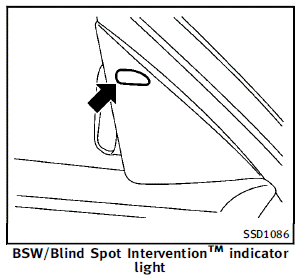
If the radar sensors detect vehicles in the detection zone, the BSW/Blind Spot InterventionTM indicator light located inside the outside mirrors illuminates. If the turn signal is then activated, the BSW/Blind Spot InterventionTM indicator light flashes and a chime sounds twice. The indicator light continues to flash until the detected vehicles leave the detection zone. The BSW/Blind Spot InterventionTM indicator lights illuminate for a few seconds when the ignition switch is pushed to the ON position.
The brightness of the BSW/Blind Spot InterventionTM indicator lights is adjusted automatically depending on the brightness of the ambient light. A chime sounds if the radar sensors have already detected vehicles when the driver activates the turn signal. If a vehicle comes into the detection zone after the driver activates the turn signal, then only the BSW/Blind Spot InterventionTM indicator light flashes and no chime sounds. (See “BSW/Blind Spot InterventionTM driving situations” later in this section.)
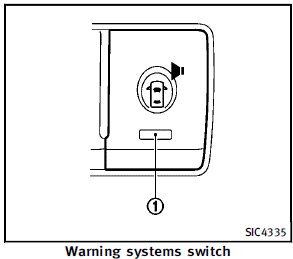
The warning systems switch is used to turn on and off the BSW system when it is activated using the settings menu on the center display. See “How to enable/disable the BSW system using the settings menu” later in this section. When the warning systems switch is turned off, the indicator 1 on the switch is off. The indicator will also be off if the BSW, the Lane Departure Warning (LDW) and the Forward Collision Warning (FCW) systems are deactivated. For the LDW and FCW systems, see “Lane Departure Warning (LDW)/Prevention (LDP) system ” earlier in this section and “Forward Collision Warning (FCW) system” later in this section.
How to enable/disable the BSW system using the settings menu
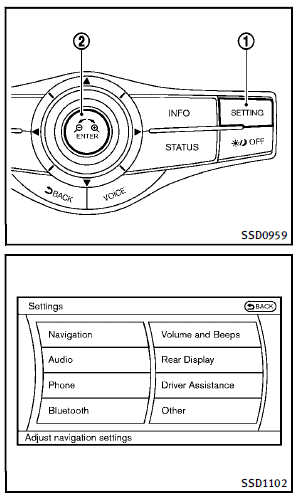
Perform the following steps to enable or disable the BSW system. 1. Push the SETTING 1 button and highlight the “Driver Assistance” key on the display using the INFINITI controller. Then push the ENTER 2 button. 2. Highlight the “Driver Assistance Warnings” key, and push the ENTER 2 button.
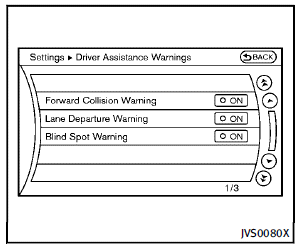
3. Highlight the “Blind Spot Warning” key, select ON (enabled) or OFF (disabled) and push the ENTER 2 button.
 Blind Spot Warning (BSW) system/Blind Spot InterventionTM system (if so
equipped)
Blind Spot Warning (BSW) system/Blind Spot InterventionTM system (if so
equipped)
The Blind Spot Warning (BSW) and Blind
Spot InterventionTM systems can help alert
the driver of other vehicles in adjacent
lanes when changing lanes.
The BSW system uses radar sensors 1
ins ...
 Blind Spot InterventionTM system operation
If the radar sensors detect vehicles in the
detection zone, the BSW/Blind Spot InterventionTM
indicator light located inside the
outside mirrors illuminates. If your vehicle
is approachi ...
See also:
Brake pad wear warning
The disc brake pads have audible wear
warnings. When a brake pad requires
replacement, it will make a high pitched
scraping sound when the vehicle is in
motion. This scraping sound will first ...
Lights
Switching the daytime running lamps on/off
This function is not available in Canada.
If you have activated the Daytime Running
Lights function and the light switch is in the
position, the dayti ...
Cleaning the sensors
NOTICE
When washing the vehicle do not aim high pressure water jets directly at the
sensors. Do not use abrasive materials or hard/sharp objects to clean the sensors.
Only use approved vehic ...


