



 Buick Enclave: Audio/Video (A/V) Jacks
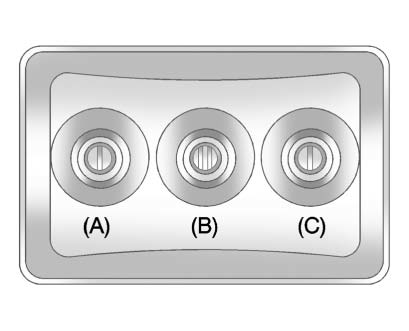
A. Yellow: Video Input
B. White: Left Audio Input
C. Red: Right Audio Input
The A/V jacks are color coded to match typical home entertainment system equipment.
The A/V jacks, located on the rear of the floor console, allow audio or video signals to be connected from an auxiliary device such as a camcorder or a video game unit to the RSE system. Adapter connectors or cables (not supplied) might be required to connect the auxiliary device to the A/V jacks.
Refer to the manufacturer’s instructions for proper usage.
Power for auxiliary devices is not supplied by the radio system.
To use the auxiliary inputs of the RSE system, connect an external auxiliary device to the color-coded A/V jacks and turn both the auxiliary device and the video screen power on. If the video screen is in the DVD player mode, pressing the AUX (auxiliary) button on the remote control switches the video screen from the DVD player mode to the auxiliary device. The radio can listen to the audio of the connected auxiliary device by sourcing to auxiliary. See Auxiliary Devices for more information.
 Battery Replacement
To change the batteries on the headphones:
1. Turn the screw to loosen the battery door located on the left side of the
headphones.
Slide the battery door open.
2. Replace the two batteries in th ...
 How to Change the RSE Video Screen Settings
The screen display mode (normal, full, and zoom), screen brightness, and setup
menu language can be changed from the on screen setup menu by using the remote control.
To change a setting:
1. Press ...
See also:
Automatic Transmission
If the vehicle is a hybrid, see the hybrid supplement for more information.
The vehicle has a Hydra-Matic® 6L80 automatic transmission, and has an electronic
shift position indicator within the ins ...
Cleaning the exterior
CAUTION
Following cleaning of the vehicle exterior (particularly with a pressure washer),
it is recommended that the vehicle is taken for a short drive to dry out the brakes.
Some high pressu ...
CD/DVD/USB memory care and cleaning
CD/DVD
► Handle a CD/DVD by its edges. Never
touch the surface of the disc. Do not
bend the disc.
► Always place the discs in the storage
case when they are not being used.
&# ...


